Free & open source · runs on your computer

Your WhatsApp history, on any phone.

Turn chat exports back into real history, merge old Android databases, and move chats between Android and iPhone — photos, voice notes and stickers included. No subscriptions, no uploads.

pipx install wakit

No Python needed — double-click to open. Apple silicon Macs; the apps aren't signed yet, so see the first-launch step.

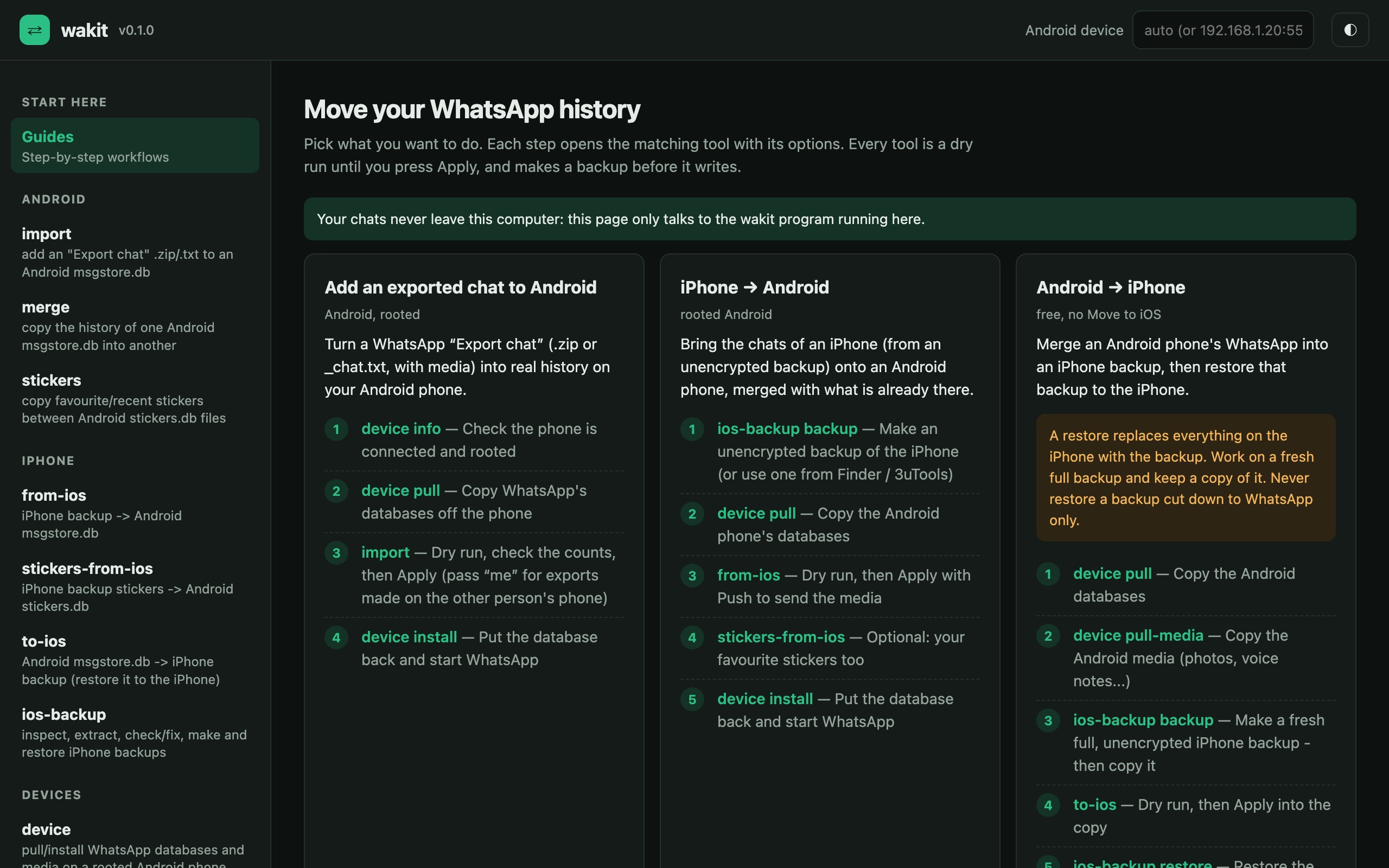
The wakit GUI: guides for adding an exported chat to Android, iPhone to Android, and Android to iPhone, each as numbered steps.
What it does

Every way your chats get stuck — handled.

wakit grew out of a real migration: dozens of exported chats, an old phone's database, a WhatsApp mod, an iPhone backup — all merged into one history, then carried to a new iPhone.

Exports → real history

“Export chat” .zip or .txt from iPhone or Android become proper messages again, with media, captions and the right sender — even exports made on the other person's phone.

Merge Android databases

Fold an old phone's msgstore.db, a WhatsApp mod or an adb backup into your current one — replies, reactions and calls included, without duplicates.

iPhone → Android

Read an ordinary unencrypted iPhone backup and merge its chats into Android, matched person by person, photos and voice notes included.

Android → iPhone, free

Write your Android history into an iPhone backup and restore it — no paid transfer app, no “Move to iOS” factory reset. Thumbnails, replies and stars carried over.

Your stickers too

Favourite and recent stickers move between Android phones and from iPhone, named the way the app expects.

CLI and GUI

One command-line tool, plus wakit gui: guided steps, file pickers, dry-run and Apply buttons and a live log — in your browser, served from your own machine.

Workflows

Four recipes, a few commands each.

Each step is a dry run first. Check the numbers, add --apply, and wakit writes — after making a backup.

Add an exported chat to Android

Rooted Android phone.

Full step-by-step guide →
Export .zip→msgstore.db→Phone
$ wakit device pull --out phone/
$ wakit import --db phone/msgstore.db \
    --export "WhatsApp Chat - Alex.zip" --contact 15551234567
# check the counts, then add --apply --push
$ wakit device install --db phone/msgstore.db

iPhone → Android

Unencrypted iPhone backup, rooted Android.

Full step-by-step guide →
iPhone backup→msgstore.db→Android
$ wakit ios-backup backup --out ~/Backups
$ wakit device pull --out phone/
$ wakit from-ios --db phone/msgstore.db \
    --backup ~/Backups/<device-id> --apply --push
$ wakit device install --db phone/msgstore.db

Android → iPhone

Rooted Android, any iPhone — no jailbreak.

Full step-by-step guide →
msgstore.db + media→iPhone backup→iPhone
$ wakit device pull --out phone/
$ wakit device pull-media --out phone-media/
$ wakit ios-backup backup --out ~/Backups   # then copy it
$ wakit to-ios --db phone/msgstore.db \
    --backup ~/Backups/edit/<id> --media phone-media/ --apply
$ wakit ios-backup restore --backup ~/Backups/edit/<id> --yes

Merge two Android databases

Old phone, mod, or adb backup.

Full step-by-step guide →
old msgstore.db→current msgstore.db
$ wakit merge --old old/msgstore.db \
    --new phone/msgstore.db --fuzzy
# dry run shows what would be copied; then --apply
$ wakit stickers --db phone/stickers.db \
    --from old/stickers.db --from-files old/Stickers \
    --files-out Stickers --apply
The GUI

Prefer clicking? wakit gui

Every command and option as a form, built from the same definitions as the CLI — so the GUI never falls behind.

  • Guided stepsPick a workflow; each step opens the right tool.
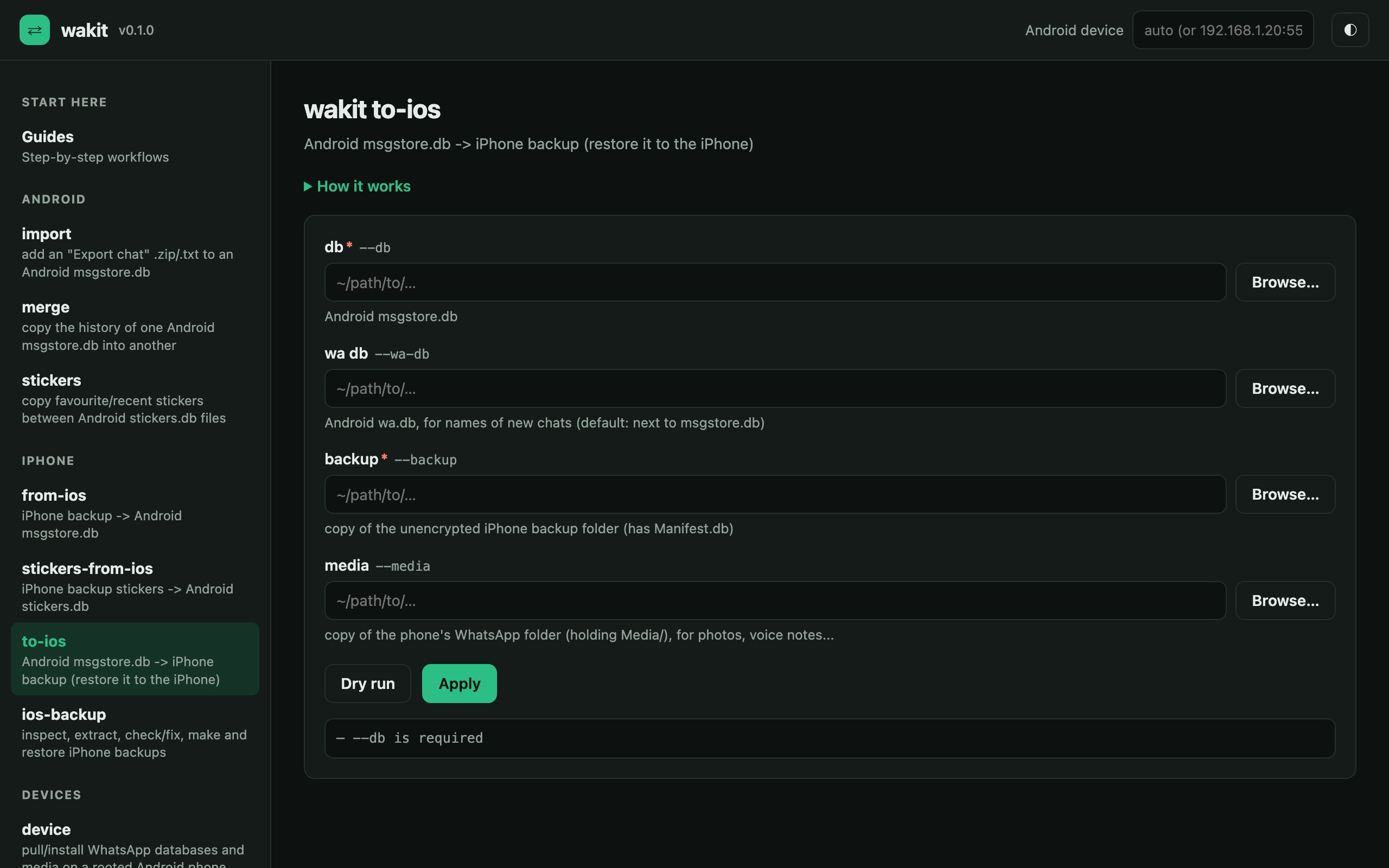
  • File pickersBrowse to your database, export or backup instead of typing paths.
  • Dry run firstSee exactly what would change, then press Apply.
  • Private by designServed on 127.0.0.1 with a one-time token. Nothing leaves your computer.
The to-ios form in the wakit GUI with fields for the Android database, the iPhone backup and the media folder, and Dry run / Apply buttons.
Safety

Built to not lose a single message.

  • Dry run by defaultNothing is written until you pass --apply.
  • Backups before every writeEach database is copied with a timestamp first.
  • No duplicatesMessages are matched by id, and by sender, text and time — re-running is always safe.
  • Safe installsThe app is disabled during copies, files get the right owner and SELinux label, and are swapped in atomically.
  • Restore-proof backupsios-backup check --fix repairs the records that make iPhone restores fail with error 205.
You needFor
Python 3.9+everything (no other Python packages)
adb + rootreading/writing WhatsApp on Android
libimobiledevicemaking / restoring iPhone backups
unencrypted backupanything iPhone (no jailbreak needed)
Restoring an iPhone backup replaces everything on the iPhone. Use a fresh full backup, keep a copy of the original, and never restore one cut down to WhatsApp only.
FAQ

Questions

Does it need root or a jailbreak?

Android: yes, root — WhatsApp keeps its database in a folder only root can reach. iPhone: no jailbreak — wakit works through a normal unencrypted backup made by Finder, iTunes, 3uTools or wakit ios-backup backup.

Is it really free?

Yes — MIT licensed, no accounts, no limits. The official “Move to iOS” is free too, but it needs a factory-reset iPhone; wakit merges into the iPhone you have.

Do my chats get uploaded anywhere?

No. wakit is a program on your computer; the GUI is a page served by your own machine on 127.0.0.1. There is no server, no telemetry.

What doesn't carry over?

Android → iPhone: reactions, polls and system notices. iPhone → Android: polls, reactions and calls. Encrypted backups (.crypt14/15, encrypted iPhone backups) are not supported — turn encryption off first.

Will WhatsApp ban me for this?

wakit only edits your own local history database; it never talks to WhatsApp's servers. It isn't affiliated with or endorsed by WhatsApp or Meta, and WhatsApp's database layout can change — always keep backups.

Which versions does it work with?

Developed against WhatsApp 2.26 on Android 7.1 (rooted) and iOS 27. Other versions should work; if a dry run looks wrong, open an issue with its output — never share your databases.